Showing posts with label whatsapp. Show all posts

Thursday, 6 November 2014

18 Best Whatsapp Tricks

| |
0 comments

18 Best Whatsapp Tricks and Tips for iPhone Android in 2014

We all know that recently Facebook bought WhatsApp messenger for $19 Billion. WhatsApp deserves this huge amount because of its awesome user interface. WhatsApp is available for all the major mobile platform OS. It is estimated that WhatsApp has more than 400 million active users around the world. Most of the people were attracted towards it because of its fast message delivery service and some other cool features. Here in this post I am sharing some cool WhatsApp tips and tricks that every WhatsApp user must know. From this post, you will get tricks to hide last seen feature, hide profile picture and status, how to use whatsApp for life long and many other WhatsApp tips and tricks. I don’t want to waste time anymore, so coming to the point.

whatsapp-tips-tricks-android

Best WhatsApp Tips and Tricks:

1. Hide Last seen feature in WhatsApp:

WhatsApp shows ‘last seen’ time at the bottom of the conversation telling your friends about the last time you were on WhatsApp. This will be helpful sometimes, but most of the time this feature troubles you when you want to stop the conversation or want to hide yourself from others. Earlier there are many third party Applications available in Google Playstore to hide ‘last seen’ feature. By the recent update, you can use this feature without installing any other apps. Download the latest version of WhatsApp from the official website to enjoy this feature.
hide-last-seen-whatsapp
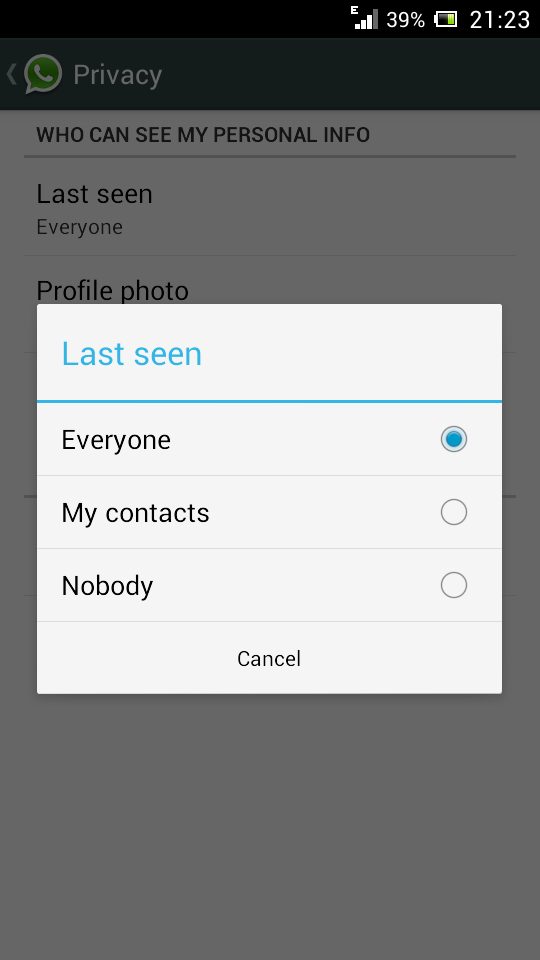
To hide last seen feature, Open WhatsApp, Go to Settings > Account > Privacy > Last Seen. There you can select three options, Everyone, My contacts, Nobody. Select any one of them

2. Lock WhatsApp with Password - Best WhatsApp Trick

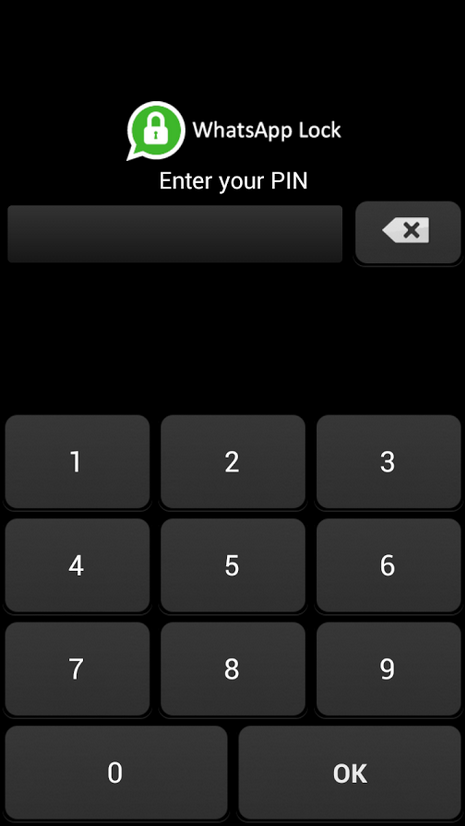
Generally we do personal chat on our whatsApp and we don’t want others to read our personal messages, as whatsApp doesn't have any login details and other person can easily read your personal messages. There are many Apps to block the unauthorized access to your WhatsApp messages. The best App we found is WhatsApp Lock.
lock-whatsapp-password
Download WhatsApp Lock from the link below and it protects your messages with a password. So that any other person cannot enter to your Whatsapp.

3. Send PDF, ZIP, APK files via WhatsApp:
whatsapp-trick-to-send-any-type-file
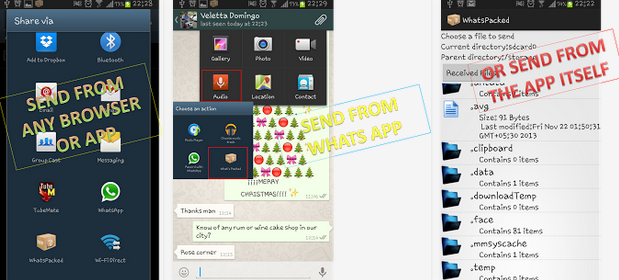
As we all know that WhatsApp doesn’t support to send other files than audio and video formats. Sometimes you may have to send some Apk files, ZIP, PDF or files of any other format. By using this cool trick you can send files of any type. Download Whats Packed 2 ads, from this App you can send a PDF, ZIP or any other files to your whatsApp contacts. The person who is receiving the file also have to install this App.
Download: Whats Packed 2 Ads

4. Extend WhatsApp Free Trial Period: 

As we all know that WhapsApp is not available for free, we only get a free trial period for 1 year to use it. After one year we have to pay approximately 1$ to use it. By using this cool WhatsApp trick you can extend your Whatsapp for one more year, truly speaking this is a very simple trick that works fine for now.
Just before completing your free trial period, delete your WhatsApp account permanently, and then create a new account. This requires less than 5 minutes, but you can extend your WhatsApp account for one more year. To delete your account, go to Settings > Account > Delete My Account. Enter your mobile number in the text field and delete your account. Now create another new account same as you created for the first time.
Now go to account and check your status, you will be increasing your free trial period for one year.

5. Recover deleted Conversions:
backup-deleted-messages-whatsapp
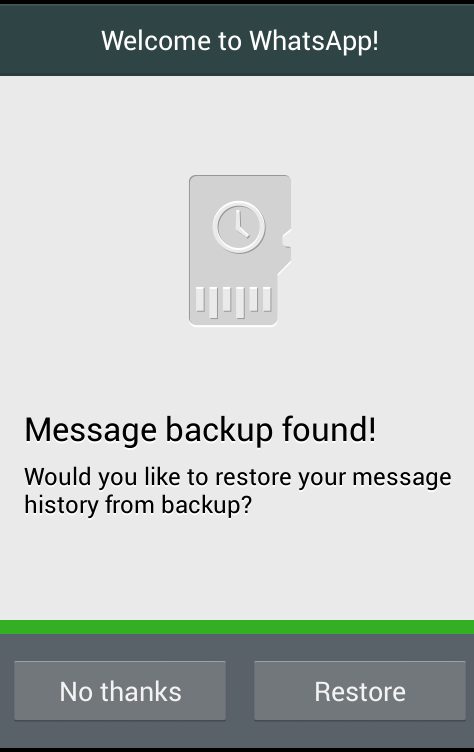
Sometime you may accidentally delete your WhatsApp conversations, and if you want to get it back. Then this trick is especially for you. Generally WhatsApp backups all the conversations and it will be stored in phone’s memory.
If you want to restore conversations, just uninstall the WhatsApp and re-install again. While re-installing WhatsApp, it will ask you whether to restore messages history or to continue without restoring. Now, click on Restore to get back your deleted conversations.

6. Download WhatsApp for PC / Laptop:

Yes!!! Now you can even install WhatsApp Messenger on your PC or Laptop and start chatting with your Friends on WhatsApp. To install WhatsApp on your Computer or Laptop you need to download an Emulator software. The best Emulator software we found is Bluestacks. Download the Bluestacks for official website. Then after run it on your PC or Laptop. After installing Bluestacks, open it and search for WhatsApp, install it and start using WhatsApp on PC.
 
7. Create Shortcuts for Important Contacts:
Here is a simple trick to create a shortcut for WhatsApp contacts. In Android phones you can easily create a shortcut for a Group or a Contact by having a long press on it. A tab will pop ups and then select add conversation shortcut. That's it; a shortcut will be created for any contact or group.
create-shortcuts-whatsapp-contacts
 But it is not much simple in case of IOS, for that you have to install a third party application called 1TapWA to get this feature. This app also has some extra features like photo editing and action scheduler.

8. Trick to Stop Auto downloading images and videos:

stop-media-auto-download-whatsapp
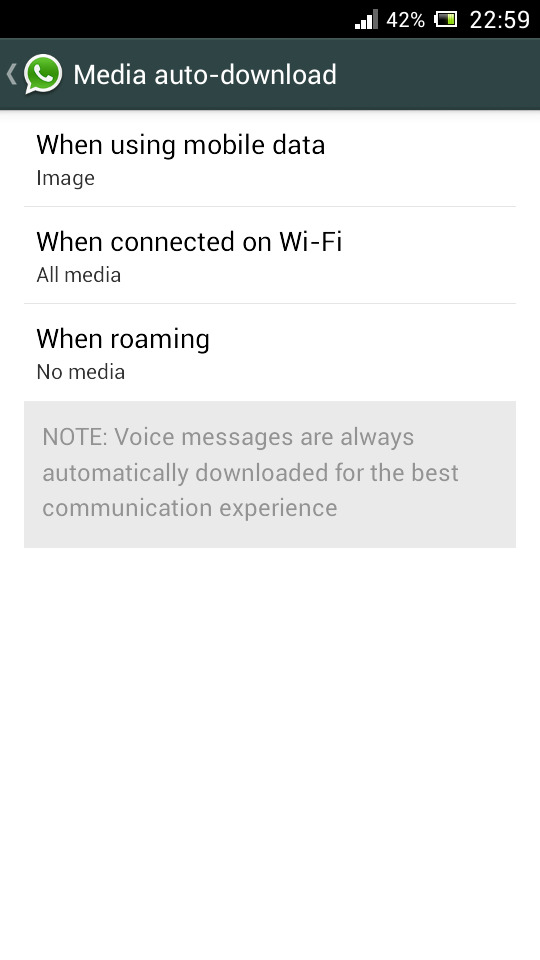
WhatsApp has a default feature of automatically downloading all the media files such as images and videos. Sometimes this may kill your mobile data and battery life when you have a very low data balance on your mobile. So this trick will be helpful to stop auto download of images or video.
To disable auto download feature, open WhatsApp go to Settings > Chat settings > Media auto-download. There you will find the option as shown in above screen shot, change the settings as per your need. Here I stopped to download only video files on mobile data.
  Also Check: Best Racing Games for Android

9. Cool WhatsApp trick to Hide the sent image with other Image

Sounds cool right? yes you can hide the images that you have sent to your friends inside any other wierd images. Magiapp tricks App for Android and Fhumb App for iPhone allows you to hide the sent image inside other images.
This is how the app works, the image that you have sent is replaced with the other image, when they click on the image they will be seeing the orginal image. Unfortunately this trick won't work for Blackberry and Windows phones.
10. Get your WhatsApp Statics:

Want to know how much time you spend daily on WhatsApp? You can get the information about sent messages, received messages, media bytes sent/received by going to Settings > Account > Network Usage. If you are not satisfied with this statistics then you must download WATSTAT App, this App will give the information regarding total time spent, message distribution, active timings and much more about your WhatsApp usage on colorful graphs.

11. Hide your WhatsApp profile picture:

hide-profile-pic-whatsapp
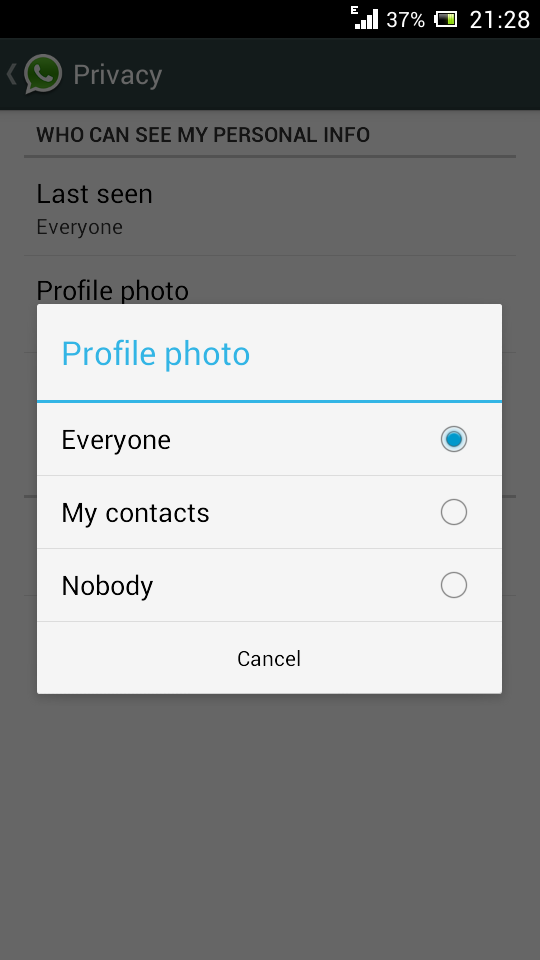
Hiding Profile Photo option is only available for the latest version of WhatsApp. If you are not using the latest version of WhatsApp then download it from here. After installing just go to Settings > Account privacy. Then click on Profile Photo, select any of the three options according to your needs - Everyone, My contacts, Nobody.

12. Stop WhatsApp Images appearing in Photo Album:

Images or Video files sent to you on WhatsApp by your friends, crush or business partners automatically appears on photo Gallery or any other photo viewer Apps. Sometimes there may be private images, so if you want to stop your WhatsApp images appearing on Gallery, follow below the trick for both Android and IOS.
stop-whatsapp-images-gallery%5B1%5D
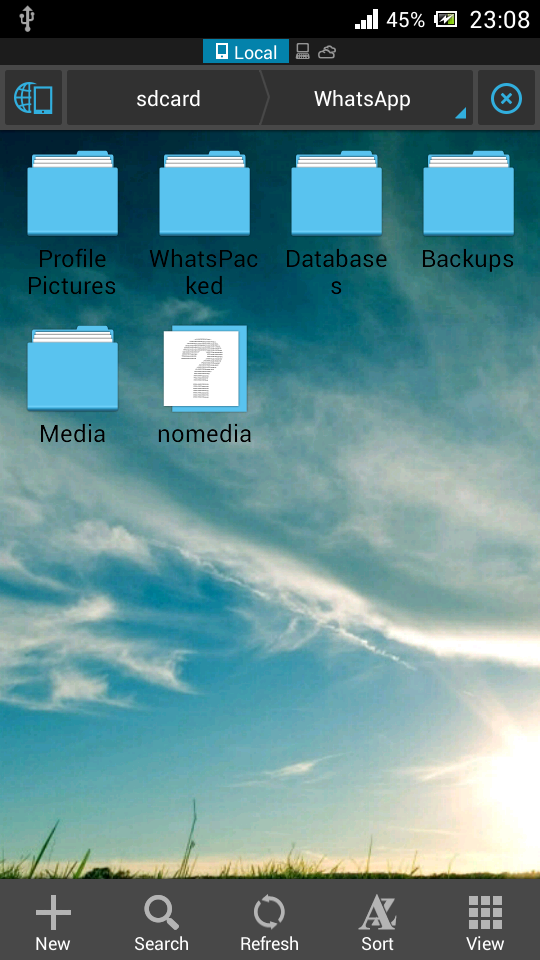
For Android users: To stop WhatsApp images appearing on image gallery you need to have a File Manager Application. Here I am using ES File explorer App. Now Open ES File Explorer App, Go to WhatsApp folder, open WhatsApp images folder and create a file with name .nomedia. To do this Tap New button in the lower left, choose File and create a file with name .nomedia
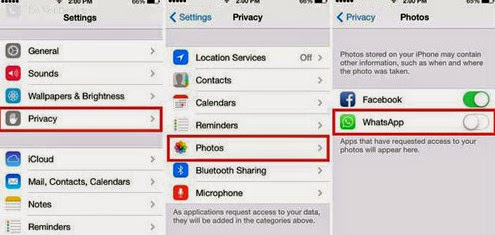
For IOS users, just go to Settings > Privacy > Photos and uncheck WhatsApp.
stop-whatsapp-images-appearing-album

13. Create Fake Conversation on WhatsApp - Best WhatsApp Tips and Tricks

Ever thought of creating a fake conversion to prank your friends? Yes you can create fake conversation by using Whatsaid App. By using this App you can easily create fake conversation on WhatsApp and prank your friends. 

14. WhatsApp trick to share a file More than 16MB size:

By default WhatsApp doesn't allow to share a file of size more than 16MB, Although images and audio messages doesn't occupy more than 16MB but when it comes to Videos, they may occupy more than 16MB size. To send video's of size more than 16MB you have to compress the size of video. By using Video Converter Android, you can compress the actual size of videos without losing much quality and later you can send video on WhatsApp.
Download: Video Converter Android

15. Trick to Install WhatsApp on Mobile without SIM Card:

For this trick you need to have two mobile phones, one to verify the number and other to use WhatsApp on it (Without SIM Card) and a SIM Card with mobile number that is not registered on WhatsApp.
This number is used to configure your WhatsApp on Mobile that doesn't have SIM Card.
First of all connect your mobile to internet through Wi-Fi or Dongle, download WhatsApp on it. Then register with the mobile number that we discussed earlier. Now you will see a message with verification fails, don't worry you will receive the verification code within 10 minutes. Now you will get an SMS with verification code to the registered number, select 'call me to verify the code' option and verify the code. That's it now can use WhatsApp on your mobile without having a sim card.

16. WhatsApp Trick to Migrate Conversation from one Phone to other:

Here is simple trick to transfer all WhatsApp conversions from old phone to new phone. Just before installing WhatsApp on your new phone, take a while and go to File manager > WhatsApp Folder > Databases on your old Android phone. Now copy all the backup files to your PC. Now install WhatsApp on your new Phone, place these files at the same location on new Phone and restart the Application. That's it now you can see all your old conversations on your new phone.
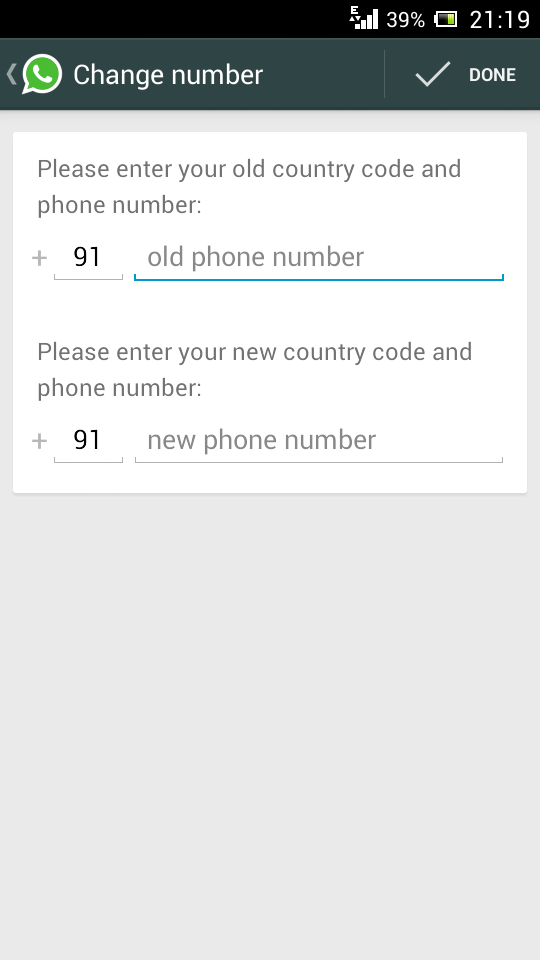
17. Change Phone number linked with WhatsApp:

Do you want to change your SIM Card and continue with the same Phone, then you no need to uninstall and reinstall WhatsApp to change WhatsApp number.
whatsapp-trick-change-mobile-number
There is a default option available on WhatsApp to change mobile numbers. For that go to Settings > Account > Change number. Enter both old and new phone numbers and press Done.
Now verify your new number, all the Groups, messages will be migrated to your new Phone number.

18. Hide your Mobile number in WhatsApp Groups:

Do you often involve in WhatsApp Group chats with unknown people? If you want to keep your mobile number disclose to others then this is an awesome trick for you.
1. First of all, uninstall and reinstall WhatsApp on your Android Phone.
2. At the time of verification, put your mobile in flight mode or change message the center number.
3. Choose 'Verify through sms' and enter your email id and Click on send. Now Without wasting a single second, click on Cancel. This terminates the authorization process.
4. Now you have to spoof that message, for that download Spoof Text message.
5. Now go to Outbox > Copy the message details of Spoof App > send it to Spoofed Verification
6. Use the below details
To: +447900347295
From: +(Country code)(mobile number)
Message: Enter you email id
Now a message will be sent through that spoofed number. Now that Spoofed number is visible to others instead of your original mobile number.
That's all about the Best WhatsApp Tips and Tricks for iPhone and Android 2014. If you find any other WhatsApp Tips and Tricks kindly share with us through your comments.
Read More

Wednesday, 29 October 2014

100 Best WhatsApp Status

| |
0 comments


Best whatsapp Status
Whatsapp status are a great way to share what is running in your mind today. If you want to add some creativity to your Whatsapp status then you come at a right place, today we are sharing 100 best Whatsapp status for Whatsapp users . These best whatsApp status are handpicked by us from various sources and you can use these short whatsapp status to influence people over whatsapp. So without taking much of your time, here is the list of 100 best Whatsapp status.


  1. Had a really great "Night Out" last night, According to my police report.
  2. I will win, Not immediately But Definitely.'
  3. If you're talking behind my back, you're in a good position to kiss my ass!
  4. Dear Math, please grow up and solve your own problems, I'm tired of solving them for you.
  5. The road to success is always under construction.
  6. Doubt kills more dreams than failure ever will.
  7. Born to express not to impress.
  8. Silent people have the loudest minds.
  9. Sometimes it's easier to pretend you don't care, than to admit it's killing you.
  10. You cannot stop the waves but you can learn to surf.
  11. Life is like photography, You use the negatives to develop.
  12. Two things are infinite: the universe and human stupidity; and I'm not sure about the universe.
  13. War doesn't determine who's right. War determines who's left.
  14. When someone says, "You've Changed", It simply means you've stopped living your life their way.
  15. If you want to make your dreams come true, The first thing you have to do is wake up.
  16. I don't have dirty mind, I have Sexy imagination.
  17. Whenever i think of quit smoking, I need a cigarette to think.
  18. You never know how strong you are, until being strong is the only choice you have.
  19. You have to be ODD, to be number ONE.
  20. When life puts you in tough situations, don't say, why me? Just say, try me!
  21. I stopped fighting with my inner demons. We are on the same side Now.
  22. If people are trying to bring you 'Down', It only means that you are 'Above them'.
  23. Failure is the opportunity to begin again more intelligently.
  24. The greatest advantage of speaking the truth is that you don't have to remember what you said.
  25. Nothing in the world is more common than unsuccessful people with talent.
  26. Be a good person, But don't try to prove.
  27. Mistakes are proof that you are trying.
  28. Some people are alive only, Because it's illegal to kill them.
  29. I am not failed......My success is just postponed.
  30. If you like me Then raise your hand, If not then raise your standard.
  31. When i was born..Devil said.."Oh Shit..!! Competition".
  32. I work for money, For loyalty Hire a Dog.
  33. I am always right, Once i thought that I am wrong, But i was wrong.
  34. I know i am something, Because god doesn't create garbage.
  35. If you are gonna be two-faced, Honey at least make one of them pretty!
  36. When nothing goes right..!! Go left.
  37. If you can't convince them, Confuse them.
  38. I love to walk in fog, Because nobody knows i am smoking.
  39. I am not drunk, I am just chemically off-balanced.
  40. Oh, So you wanna argue, Bring it. I got my CAPS LOCK ON.
  41. I am so poor that i can't pay attention in class.
  42. Warning...I know KARATE.......And few other oriental words.
  43. I used to be an atheist, But then i realized i'm God.
  44. Never make eye contact while eating a banana.
  45. Success is like being pregnant everybody congratulates you, But nobody knows how many times you got fucked to get there.
  46. I am not virgin, My life fucks me everyday.
  47. Nothing is over until you stop trying.
  48. Person you love is 72.8% water.
  49. I talk to myself because i like dealing with a better class of people.
  50. People say, you can't live without love...I think oxygen is more important.
  51. 80% of boys have girlfriends.. Rest 20% are having brain.
  52. When everything comes your way.. Then you are on the wrong way.
  53. she's so fake, if you look behind her neck. I bet it says "Made in china".
  54. I drink to make other people interesting.
  55. If at first, you don't succeed..Keep flushing.
  56. Save water drink beer.
  57. Virginity is not dignity, It is just lack of opportunity.
  58. Not all men are fools, Some stay bachelor.
  59. Don't kiss behind the garden, Love is blind but the neighbors are not.
  60. His story is History, My Story is Mystery.
  61. Phones are better than girlfriends, At least we can switch off.
  62. Smile today, tomorrow could be worse. 
  63. The difference between stupidity and genius is that genius has its limits. 
  64. If you don't succeed at first, hide all evidence that you tried.
  65. Stop worrying about the world ending today. It's already tomorrow in Australia.
  66. Cell phones these days keep getting thinner and smarter... people the opposite.
  67. Diet rule #1: If nobody sees you eating it, it doesn't contain any calories.
  68. I love my job only when I'm on vacation
  69. Friends come and go, but enemies remain and build up.
  70. Never test how deep the water is with both feet.
  71. The richer you get, the more expensive happiness becomes.
  72. Parachute for sale, used once, never opened!!
  73. My wife dresses to kill. She cooks the same way.
  74. FREE PUPPIES: Half cocker spaniel, half sneaky neighbors dog.
  75. Behind every successful man is a surprised woman.
  76. In my house I'm the boss, my wife is just the decision maker.
  77. I'm not online, it's just an optical illusion.
  78. That's the secret to life... replace one worry with another.
  79. If there is a "WILL", there are 500 relatives.
  80. How is a poor man a lot like a rich man? They both have an iPhone.
  81. Some people call me Mike, you can call me tonight.
  82. When inspiration does not come to me, I go halfway to meet it.
  83. Whatever it is -- I didn't do it!
  84. Sometimes you succeed.... and other times you learn.
  85. There are three sides to an argument - your side, my side and the right side.
  86. When there's a will, I want to be in it.
  87. Failure is not an option -- it comes bundled with Windows.
  88. I always dream of being a millionaire like my uncle!... He's dreaming too.
  89. I believe there should be a better way to start each day... instead of waking up every morning.
  90. When I was kidnapped, my parents snapped into action. They rented out my room.
  91. Scratch here ▒▒▒▒▒▒▒▒▒▒▒▒▒▒ to reveal my status 
  92. I'd rather have honest enemies than fake friends.
  93. My "last seen at" was just to check your "last seen at".
  94. Not always "Available".. Try your Luck..
  95. Hey there whatsapp is using me.
  96. I'm not lazy, I'm on energy saving mode.
  97. You can never buy Love....But still you have to pay for it.
  98. Totally available!! Please disturb me!!��
  99. “Success” all depends on the second letter.
  100. Life is Short – Chat Fast!
Read More

Monday, 8 September 2014

WhatsApp: how to get “chat heads” notifications

| |
0 comments
When Facebook Home first was introduced, it brought with the “chat heads” that provided a nice little notification in the corner of your display with a picture of your contact. You could then click on the picture and then seamlessly read and respond to messages without having to stop what you’re currently doing on your device.  If you’ve liked the way this works, but use another messaging service more than Facebook Messenger, take a look below and we will explain how to achieve the same results.
Facebook Messenger isn't the only messenger with chat head functionality.
To achieve this, you’ll need to download an application called Seebye Chat Heads which is available via the Google Play Store. It is a module of the Xposed Framework and does require root access.

Downloading Seebye Chat Heads

Thanks to this application, we can get the chat head notifications for other messaging apps, such as WhatsApp, to appear on the screen with a small circle and a picture of the contact. By click on this bubble, you’ll get access to three options in which you can see the conversation, mark it as read, or even reply.

chat heads
Much like Facebook Messenger, the chat heads can be moved anywhere on the screen so as to not obstruct your view of the display. As well, to get rid of a chat head, you simply have to do a long press on the icon and then drag it to the bottom of the screen where a "X" will appear. If you let go over the "X", the chat head will disappear from the display.
Read More

Saturday, 16 August 2014

List of Whatsapp Tips, Tricks & Awesome Hacks

| |
9 comments


Whatsapp is considered as the most preferable chatting client for iPhone and Android devices as its pretty user friendly interface and provides all the basic needs a chatting client requires, you can easily share images, audio notes, live recordings, share your current location and even upload small videos. Well earlier we have posted on how you can easily install whatsapp messenger on your windows pc in case you wanna use it right away from your computer you can do that too.
But now we found some nice hacks and tricks that work pretty well with whatsapp and people are seriously searching for this constantly. So just check the full list provided below and enjoy these awesome hacks.

#1. Prank your Friends by Changing their Profile Picture

funny-scary-images
Well just found this awesome trick, if you want to prank your friends by displaying then how they actually appear in your profile, then we have any trick for that. Actually by doing some files replacement you can change the actual profile pic of you friend pretty easily to any image.
  1. Well just search for some nice scary or funny image that you think could easily paralyze your friends on how they actually look. (just search these images on Google Image search).
  2. Now after you have found a nice image just make sure to resize the image to 561 X 561 Pixel dimension as its must. (you can use RIOT image resizing feature for this).
  3. Now you need to navigate to the following path SD Card > Whatsapp > Profile Pictures.
  4. Now you will see your friends profile pictures with name's similar to their phone numbers with prefix attached to it.
  5. Now just rename your new image to that same file name and then replace the old image with the one.
  6. Well for iOS device use iFunBox to do this same trick and on android you can use a nice file manager to achieve this effect.
Now simply restart your device and your new profile pic will be rocking, now simply show and ask your friend what kind of profile picture they have uploaded it looks ugly, they will be amazed :p

#2. Getting back Deleted Messages on Whatsapp !

Deleted few conversations mistakenly, wanted to get all those conversation back as it means you a lot, well you might not be aware about the automated Whatsapp backup that it creates everyday @ 4PM which is actually store in the SD Card of your Android Device, well we are going to see how you can easily restore that database.
  1. Navigate to the Whatsapp Database folder, SD Card > Whatsapp > Databases.
  2. In the database folder you will see some files something like msgstore-2014-01-04.1.db.crypt. So as you can see these files even contain the date on which its created + you will also see a file msgstore.db.crypt, well this is the main file.
  3. So now just rename this file msgstore.db.crypt to something like backup-msgstore.db.crypt.
  4. Now after you have successfully renamed your file, just change the another file that contains the appropriate date like choose the one that's latest or the one you think that might contain your chat conversation.
  5. Get-back-deleted-whatsapp-messagesSo now rename that file to msgstore.db.crypt and then the last step is to navigate to Setting > Applications > manage applications > Whatsapp, and click on Clear Data option to remove all the data.
  6. That's it now your msgstore.db.crypt will be restored and obviously that the file that contains your chat conversation.
  7. So now as soon as you open your WhatsApp again it will ask you to restore from the Backup.
  8. Just press Restore option and everything will be restores pretty easily.
So guys this was the easiest but little but lengthy way to restore your deleted conversation on WhatsApp. So now do no worry in case you have to delete those conversation you know where and how to restore then later :)

How to View WhatsApp Messages Backup File Online !

recover-messages
Well thinking if there is any easy way by not restoring your file onto the whatsapp messenger but still wanna have a look on what conversation you had, well there is awesome online service called "RecoverMesages.com" that allows you to upload your .crypt file that you got from your SD Card online and view your messages easily, well just visit the above mentioned website , upload your date and hit SCAN.

#3. Hide Last Seen Time from your WhatsApp Profile

Don't like to display that last seen time to the another person, just want to stay hidden, well earlier it was not possible and we use to use some 3rd party apps, well now it can done officially.
  1. Open WhatsApp application on your device.
  2. Navigate to Settings > Chat Settings > Advanced > Last Seen Timestamp.
  3. It will be one just disable it and that's it now no one can see your last seen timestamp. So its officially disabled.

#4. Hide One Image into Another for Nice Prank :p

magiapp-whatsappWell you might have faced this thing but you might ignored as you thought it could not be possible, but yes you can easily fake any image by just simply using original image as your masked image and using another image as your fake image.
Well we will be using the Magiapp for Android that will allow you to hold two images one your True Image and the other one will be your Fake image that will shown when someone clicks on your original image.
  1. Download & Install Magiapp for android.
  2. Now after installing this wonderful app just fire it up and then you will see interface something lie in the image on the right.
  3. Now just click on the True Image option and choose your original image and then click on the Fake Image option and choose your pranky image.
  4. Now after selecting your images just press Do Magic ! option and voila! its done now just share your image with everyone.

#5. Hacking your Friends WhatsApp Conversation :)

Well now the same trick mentioned in the first step can be used in order to hack your friends WhatsApp conversation. You can easily snatch the .crypt files from your friends SD Card and then view them online using the RecoverMessages website.
  1. Just try to explore the friends SD Card and navigate to SD Card > Whatsapp > Database folder.
  2. Here you will two files -msgstore-yyyy..dd..db.crypt which will exactly contain date and year when the backup was created.
  3. Simply copy this files to your computer and then upload this file to "RecoverMesages.com" to view them online.
That's it now you have easily hacked your friends Whatsapp Database, now you can view all the conversation and even ask him about his or her crush ;p, so guys this how hacking Whatsapp conversation works, so enjoy.

#6. Password Lock your WhatsApp Application

whatsapp-lock-androidAre you really serious about the security and privacy for your Whatsapp conversation, well now just add a nice password on your Whatsapp application, so that no one else except you can open your Whatsapp account.
  1. Download & Install WhatsApp Lock for Android.
  2. It's a simple application that allows you to add a four digit lock passcode to your Whatsapp application.
  3. Now after installing the application it will ask you to store a four digit passcode, just do that.
  4. It even contains an Auto Locking feature that will lock your Whatsapp automatically after sometime.
The best thing about this application is that if someone enters wrong passcode few times then if your phone contains the front camera then it will capture the image of the intruder and store it safely.


So guys these were the few tips, tricks and hacks for the whatsapp messenger, hope you liked them and if you really like this post do share it with all your friends. Do subscribe to our newsletter for receiving some awesome updates from our blog right in your email and you can even become our fan on facebook :)
Read More

Thursday, 14 August 2014

25+ Best Whatsapp Status Quotes Of All Time

| |
2 comments


Hello friends I'm back with some exciting whatsApp Status updates....

Whatsapp has become the most popular chat app among the smartphone users arond the world.So every person wants to show his or her mood in their status. Status is very helpful for your friends in knowing what your mood is right now.
So i have written this post to provide you the best whatsapp status quotes of all time. Have a look at these eye catching lines.
 
1. Don’t judge someone’s life until you’ve felt their pain.
2. I don’t care if you talk about me behind my back because good or bad, my name is still in your mouth.
3. Today I feel myself faster than the wind and harder than a rock.
4. Do not look down or you’ll lose
sight of the horizon of your goals.
5. Never mind that because of the
fatigue I cannot walk, I won’t never
stop, the goal is waiting for me.
6. I love everything, that you and I can call "ours" !!
7. Never apologize for being you.
8. If they don't chase you when you
walk away, keep walking.
9. Whatever i perform is not to
impress you, But to express myself…
10. Attitudes are contagious. Are yours worth catching?
11. Everyone has his burden. What
counts is how you carry it.
12. If you can quit, quit. If you can't quit, stop complaining - this is what you chose.
13. “Well, if it can be thought, it can be done, a problem can be overcome”
14. “No matter how bad things get, just keep looking up. Just keep looking up her skirt. Or his kilt. ”
15. “Boys Shack, MEN build homes.
16. “There’s nothing more dangerous than a boy with charm.”
17. “As usual, there is a great woman behind every idiot.”
18. “A girl should be two things: classy and fabulous.”
19. “When a man gives his opinion, he's a man. When a woman gives her opinion, she's a bitch.”
20. “When someone loves you, the way they say your name is different. You know that your name is safe in their mouth.”
21. “I'm not young enough to know
everything.”
22. “Man may have discovered fire, but women discovered how to play with it.”
23. “Man, when you lose your laugh you lose your footing.”
24. “And now, I'm just trying to change the world, one sequin at a time.”
25. " Y0u sh0uld've slapped Me the day We f!rst met !nstead 0f Smiling coz n0w i jst can't feel any Pa!n after u played ma heart t0 th!s much beat!ng. "
26. " Wow! The last time I saw something like you, I flushed it!
Read More

Friday, 23 August 2013

How to Download Whatsapp for PC or Laptop -Windows 7/8 and Mac

| |
0 comments
  •   Are you the one who don't have a Smart phone? and still want to use whatsapp?
  •     Want to run android apps and play android games on pc?
  • We have Solution for all your Questions:-

Then you are at the right place now you can use whats app on your PC for free.whats app helps you to connect with friends family.

    Go here and Download bluestacks
    Now run the downloaded application.
    Now you have installed Bluestacks Successully.You can skip the below step.
    If you are Getting Some Error as below while installing

    Error: "The application failed to initialized properly (0xc0000135) . Click on ok tp terminate the application",then .NET framework is missing on your PC. Go to End of article to get .NET framework

    Note: Get .NET Framework only if you are getting Error

  •     Now open the application you can find the screen capture just like below picture
search+fro+whatsapp


  •     Now Click on Search icon and search for Whatsapp

whatsapp+for+pc

  •     Now choose the whatsapp messenger form any market .its your wish.

choose+whatsapp+from+any+market

  •     Just click and Download whatsapp after selecting from any app store
download+whatsapp


  •     You can find downloaded app in My Apps.

whatsapp+in+my+apps
  •     Now click on Whatsapp fill the details and start using it.
  •     If you want to uninstall any app just hold the app and click cross button.
  •     To add Contacts just follow below screen capture
ad+contact+in+whatsapp


Download .NET framework use if you are getting error like above)
If you Still have any problem feel free to comment below.we will help you :)
Read More
Sarv. Powered by Blogger.